# Account System
# 1. What is the imoo account system?
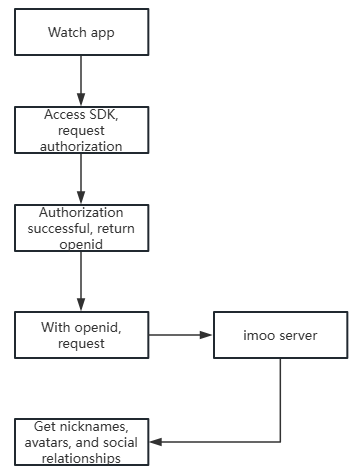
It is the account number of a watch in an application, and the account identification of a watch in different applications is different and unique.
Based on the imoo account authorization, apps can obtain users’ nickname, avatar and other basic information, and even can offer users product functions like sharing contents to friends or friend ranking.
# 2. Account system interface process
# 2.1 imoo Open Platform Entry Application
Please offer your app name, apk name, developer name to imoo. imoo will assign your application with appId, appSecret, and third-party application privilege scope (default avatar, name, and push), and then synchronize the appId and appSecret information to app developer.
# 2.2 Development interface
- Integration of the watch account system sdk is required.
- How to get the sdk: Ask the technical engineer of imoo to get it.
# 2.3 Test Docking
- The appId and appSecret of the test environment may be different from those of the official environment. When synchronizing the application, it will be stated which environment the appId and appSecret corresponds to, so you can just use the corresponding appId and other application information to pass the parameter in the corresponding environment.
- When you visit imoo's server interface, please use the test environment domain name when debugging, and please apply official environment domain name when you pass the test and submit your official version..
Test environment domain name: https://api-module.okii.com
Domestic official domain name: https://third-api.watch.okii.com
Southeast Asia domain name: https://api-sa.imoo.com
Vietnam domain name: https://api-vn.imoo.com
European domain name: https://api-oz.okii.com
U.S. domain name: https://api-us.imoo.com
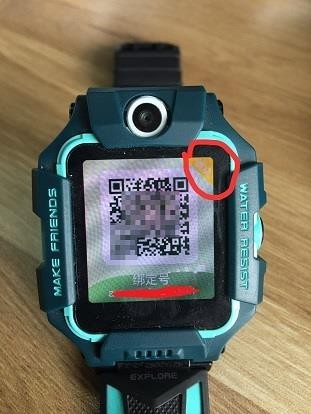
- Please note that there are test environment and official environment for the watch. To determine the current environment of the watch: Click the watch binding number -> Observe the upper right corner, if there is the word module, it is the test environment, otherwise it is the official environment, the following picture is the sample picture of the watch in test environment.
- How to switch the watch environment: Please contact imoo.
# 2.4 Launch your Application in imoo app store
# 3. Guidelines for interfacing with the account system
# 3.1 Account Authorization Service Timing Diagram
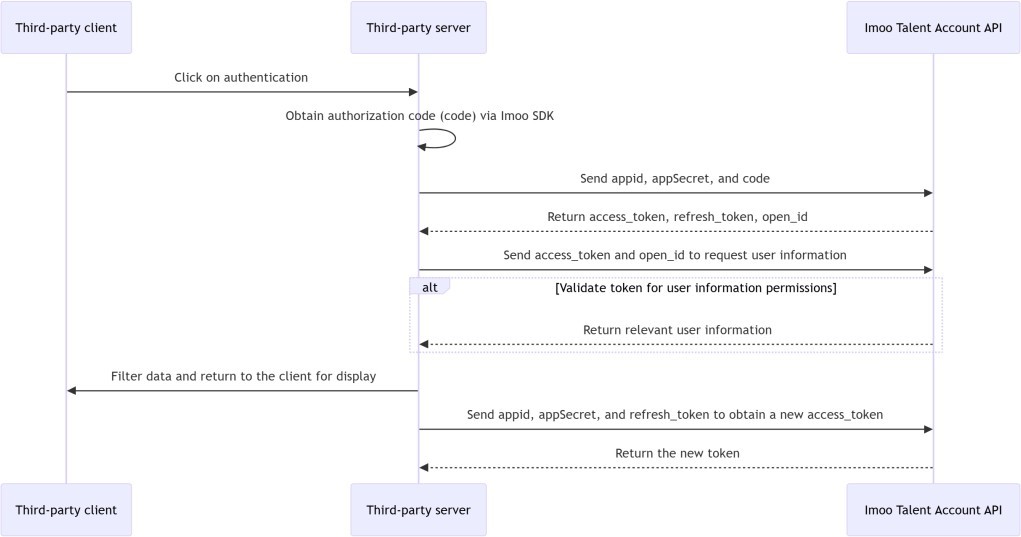
Note: The current appId, appSecret and third-party app permission ranges are assigned by the imoo server and then synchronized with the information to app developer..
# 3.2 Call the token API based on the authorization code to obtain the identity credential accessTokenn
# 3.2.1 Timing of calls
- After you obtain an authorization code from the SDK on the client, the authorization code is valid for 10 minutes..
# 3.2.2 Interface description
- Function: Get the watch's temporary identity information credentials, through which you can get the watch avatar, name and other information.
- Request method: POST
- Protocol type: HTTPS
- Data format: json
- Service URL: /oauth/token
- Note: Users can cancel the authorization on their own initiative, at which time the previously obtained token will no longer be valid, and the cancellation of the authorization will not notify the third-party at this time.
- Message direction: third-party application -> open service
- Request Parameters
| Parameter | Parameter name | Type | Required | Parameter description |
|---|---|---|---|---|
| appId | Third-party application unique identification | int | Y | Application identification ID assigned to the accessor by imoo |
| appSecret | Third-party application secret key | String | Y | Application secret key assigned by imoo |
| code | Authorization authentication code | String | Y | Authorization code obtained through imoo watch SDK (valid for 10 minutes) |
| grantType | Authorization type | String | Y | Fixed value: authorization_code |
- Example
{
"appId": 100001,
"appSecret": "123456",
"grantType": "authorization_code",//fixed value
"code": "0b6bbfedc7044676a65c63e6959d81c2"//authorization code
}
- response message
{
"code": "000001".
"desc": "SUCCESS".
"data": {
"accessToken": "3d9eb36db7594c569702a940e9e86b0d",// user authorization credentials, valid for 3 days
"expiresTime": 259200, // token expiration time in seconds (S)
"refreshToken": "8e49c6c296024518bf352c97a29cadf7",// This parameter
can be used to get a new token when the token expires, valid for 90 days.

"openId": "a614044b00a8406387aeba629b0e4f75",// Indicates the unique ID of the watch in the app
"scope": "1"
}
}
Note: There are currently the following types of scope transmission ranges, and the permissions need to be assigned by the imoo Open Platform
| Value | Permission Name |
|---|---|
| 1 | User's basic information |
| 4 | User Friend Ranking |
| 5 | Push to family chat group, Watches on Service Account |
- Return Status
| Status code | Alert message |
|---|---|
| 12001 | Invalid parameter |
| 12002 | Wrong type of authorization |
| 12007 | Invalid APPID or APPSecret information |
| 12004 | The authorization code has expired, has been used, or does not exist (if it is not one of the first two cases, check that the URLs of the watch environment and the server's calling environment are the same, see section 2.3 for watch environment view) |
# 3.3 Getting a new accessToken based on the refreshToken interface
# 3.3.1 Functional description
You through the authorization code call token interface to obtain accessToken (valid for three days) at the same time will return a refreshToken (valid for three months), when the accessToken expires through the refreshToken interface to obtain a new accessToken, equivalent to the renewal operation.
# 3.3.2 Interface description
- Request method: POST
- Protocol type: HTTPS
- Data format: json
- Service URL: oauth/refreshToken
- Message direction: Third-party application -> Authorization service
- Request Parameters
| Parameter | Parameter name | Type | Required | Parameter description |
|---|---|---|---|---|
| appId | Third-party application unique identification | int | Y | Application identification ID assigned to the accessor by imoo |
| appSecret | Third-party application keys | String | Y | Application secret key assigned by imoo to the access party |
| grantType | Type of authorization | String | Y | Fixed value: refresh_token |
| refreshToken | Refresh token | String | Y | Section 3.2 Refresh Token returned by the token interface |
- Example
{
"appId": 100001,
"appSecret": "123456",
"grantType": "refresh_token",//fixed value
"refreshToken": "e6c189f9cc2449b59d5eff12c1616eed"// Refresh the token (This value will be returned at the interface for obtaining the token
}
- response message
{
"code": "000001".
"desc": "SUCCESS".
"data":{
"accessToken": "3d9eb36db7594c569702a940e9e86b0d",. "expiresTime":259200.
"refreshToken": "8e49c6c296024518bf352c97a29cadf7",. "openId": "a614044b00a8406387aeba629b0e4f75",. "scope": "1"
}
}
Note: After a refreshToken has been used, a new refreshToken will be returned and the original refreshToken will expire after one minute.
| Status code | Alert message |
|---|---|
| 12001 | Invalid parameter |
| 12002 | Wrong type of authorization |
| 12007 | Invalid APPID or APPSecret information |
| 12005 | refreshToken无效 |
| 12006 | Invalid authorization, retrace the user authorization process |
# 4. Obtaining user account information
# 4.1 General
- Caller: Third-party server
- Function: Obtain information about the user via accessToken.
# 4.2 Get user information based on accessToken
Obtain information about the user's authorization based on the accessToken, which includes avatar, nickname, and the user's unique identifier openId (if the third-party application has successfully applied for other permissions on the platform, it can obtain more authorization information).
# 4.2.1 Interface description
- Request method: POST
- Protocol type: HTTPS (POST request)
- Data format: json
- Service URL: /resource-service/resource/getUserInfo
- Message direction: Third party application -> Resource service
- Request Parameters
| Parameters | Parameters name | Type | Require | Parameter description |
|---|---|---|---|---|
| accessToken | authorization token | String | Y | authorization token |
| openId | User openId | String | Y | User openId, token or refreshToken returned watch identification ID |
- Example
{
"openId": "f94d6ff02e134624bfd2fa1ddcb0fdd9", "accessToken": "c204f68d78aa41f88002f0f2374732d"
}
- response message
{
"avatarUrl": "https://watchcdn.okii.com/xxx.jpg", // watch avatar address
"nickName": "zhangwtest",// watch name
"openId": "f94d6ff02e134624bfd2fa1ddcb0fdd9",

"unionId": "cfghc6ff02e134624bfd2fa1ddcb0fdd9" //unique id for developers and users
}
- Return Status
| Status code | Alert message |
|---|---|
| 12001 | Invalid parameter |
| 12008 | Invalid or expired accessToken |
| 12010 | Invalid openId |
| 12009 | The app does not have this permission |
# 4.3 Conversion of new openId to old openId compatibility logic processing (for third party use accessed before September 2019)
# 4.3.1 Interface description
- Request method: POST
- Protocol type: HTTPS
- Data format: json
- Service URL: /resource-service/resource/getOldOpenId
- Message direction: Third-party application -> Get user account information service
- Request Parameters
| 参数 | Parameter name | Type | Required | Parameter description |
|---|---|---|---|---|
| accessToken | authorization token | String | Y | authorization token |
| openId | User openId | String | Y | User openId |
| appId | Third-party application id | int | Y | Third-party application id |
- Example
{
"appId": 100005.
"authList": [{


"accessToken": "58223983efd14a59ba37620379be85c2", "openId": "2d8b34acddb248898b5b178740f2fe26"
}, {
"accessToken": "704737e9feac4963bab34ea8b2451008", "openId": "76ef8684e5014a3cb237878778f5085b"
}]
}
- response message
{
"code": "000001".
"desc": "SUCCESS".
"data": {// Mapping map of new openId -> old openId

"76ef8684e5014a3cb237878"(newopenId): "8461B6A1564DF055A54F3EFF053D93A3"(oldopenId),
"2d8b34acddb248898b5b178740f2fe26": "C8A58D1C2539A96AC85AEC2481D7BBD9FF42BC5E3"
}
}
- Return Status
| Status code | Alert message |
|---|---|
| 12001 | Invalid parameter |
| 12010 | Invalid openId |
| 12099 | Other errors |
# 5. Open Ranking Service
# 5.1 General
- Caller: Third-party server
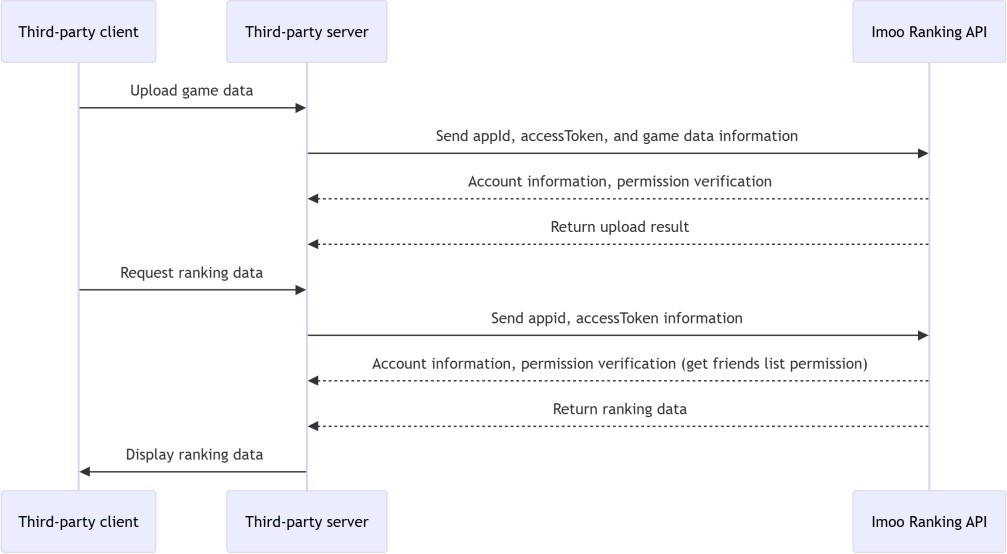
- Purpose: Enables Ranking list functionality to increase activity in third- party applications.
# 5.2 Open Ranking Service Timeline Diagram
# 5.3 Uploading Application Ranking Data
# 5.3.1 Interface description
Request method: POST
Protocol type: HTTPS (POST request)
Data format: json
Service URL: /resource-service/ranking/thirdParty/uploadData
Message direction: Third-party application -> Open Ranking Service
Request Parameters
| parameters | Parameter name | type | Require | Parameter description |
|---|---|---|---|---|
| accessToken | authorization token | String | Y | authorization token |
| openId | User openId | String | Y | User openId |
| appId | Third-party application id | int | Y | Third-party application id |
| type | Application ranking type | int | N | Third-party application type (old data and default is 1) |
| dataType | Data ranking type | int | N | The default maximum value participates in the ranking (0 maximum value, 1 minimum value) (default 0) |
| data | Application ranking data | Object | Y | Application ranking data (digital type received with Long) |
- Example
{
"openId": "c5284b3270134be28e957fe570c3e54a", "appId": 100001,
"accessToken": "1d27d3391e094828b57db767b4161e93", "type": 1,
"dataType":0,
"data": "3"
}
- response message
{
"code": "000001".
"desc": "SUCCESS".
"data":1,
}
//data is reported as successful when equal to 1, failed when -1, and not updated when null (not the highest score)
- Return Status
| Status code | Alert message |
|---|---|
| 12001 | Invalid parameter |
| 12010 | Invalid openId |
| 12011 | Authorization exceeds the scope of the application |
| 12009 | This appId has no permissions |
| 12099 | Other errors |
# 5.4 Getting Friend Ranking Data
# 5.4.1 Interface description
Request method: POST
Protocol type: HTTPS
Data format: json
Service URL: /resource-service/ranking/thirdParty/getRankingList
Message direction: Third-party application -> Open Ranking Service
Request Parameters
| parameters | Parameter name | type | Require | Parameter description |
|---|---|---|---|---|
| accessToken | authorization token | String | Y | authorization token |
| openId | User OpenId | String | Y | User OpenId |
| appId | Third-party application id | int | Y | Third-party application id |
| type | Application ranking type | int | N | Third-party application type (old data and default is 1) |
| Application ranking type | Application ranking type | String | N | Sorting type: DESC, ASC (default reverse order) |
| iconType | Avatar type | int | N | Is an avatar needed? 0 No, 1 Yes (default 1) |
| dataType | Data ranking type | int | N | The default maximum value participates in the ranking (0 maximum value, 1 minimum value) (default 0) |
- Example
{
"openId": "c5284b3270134be28e957fe570c3e54a", "appId": 100001,
"accessToken": "1d27d3391e094828b57db767b4161e93", "type": 1,
"sortType": "DESC", "iconType": 1.
"dataType":0,
"page":{// Paging parameters, non-essential, do not fill in the return all "pageSize": 1, // the number of a page

"nowPage": 1 // What page is it?
}
}
- response message
{
"code": "000001".
"desc": "SUCCESS".
"data": [// List of ranking data
{
"openId": "2d8b34acddb248898b5b178740f2fe26", "name": "White Z5",// watch nickname
"icon": "https://qn.authtest.okii.com/user_avat",// avatar address "appId": 100005.
"data": "50", "rank": 1, // rank "type": 1 // type
}
],
"extra": {// Individual's rank, a rank value of -1 means no ranking data is available
"openId": "28a49be2c4334494a4aff0c3ec428438", "name": "Zhang San".

"icon": "https://qn.authtest.okii.com/user_avat",// avatar address "appId": 100037,
"data": "10",
"rank": 5. "type": 1 // type
}, }
"page": {// Pagination information, return when there is pagination information in the input parameter.
"nowPage": 1, // current page "totalRecord": 5,// Total Records "totalPage": 3,// total pages
"pageSize": 2,// the number of pages in a page "startIndex": 4// start subscript
}
}
- Return Status
| Status code | Alert message |
|---|---|
| 12001 | Invalid parameter |
| 12010 | Invalid openId |
| 12011 | Authorization exceeds the scope of the application |
| 12099 | Other errors, contact XTC development to find out why |
| 12009 | This appId has no permissions |